

Client Hub Pricing

Streamlined Workflows for Modern Accounting and Tax Teams

Built for bookkeeping, CPA, tax, and CAS teams looking to improve client communication, streamline task management, and enhance workflow efficiency, all with simple, predictable pricing.

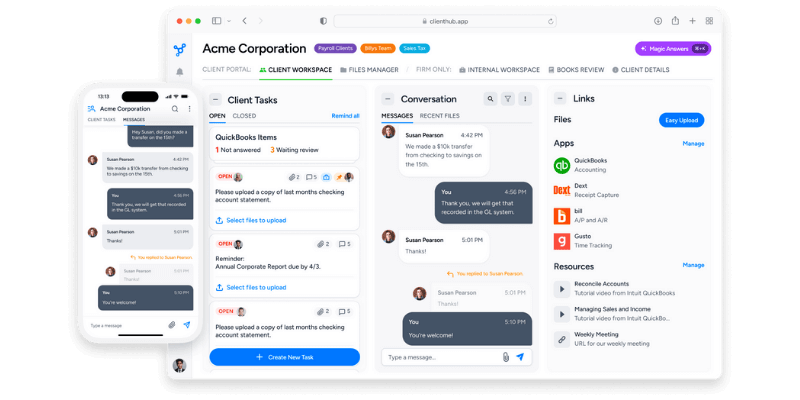
Pricing screenshot

Solopreneur

$49
single user
per month
Limited to solo user firms — all features included
Practice Management
  • Workflow
  • Dashboards
  • Time tracking
  • Email sync
Client Portal
  • Mobile app
  • Assign clients tasks
  • Secure messaging
  • File sharing
QuickBooks Integration
  • Resolve uncategorized transactions
  • Month-end close
  • Financial reports
  • 1099 Manager
Xero integration
  • Resolve uncategorized transactions

Practice Manager

$59
per firm user
per month
Complete Practice Management, Including a Client Portal
Practice Management
  • Workflow
  • Dashboards
  • Time tracking
  • Email sync
Client Portal
  • Mobile app
  • Assign clients tasks
  • Secure messaging
  • File sharing
QuickBooks Integration
  • Resolve uncategorized transactions
  • Month-end close
  • Financial reports
  • 1099 Manager
Xero integration
  • Resolve uncategorized transactions

Practice Manager

$79
per firm user
per month
+ QuickBooks and Xero Integrations
Practice Management
  • Workflow
  • Dashboards
  • Time tracking
  • Email sync
Client Portal
  • Mobile app
  • Assign clients tasks
  • Secure messaging
  • File sharing
QuickBooks Integration
  • Resolve uncategorized transactions
  • Month-end close
  • Financial reports
  • 1099 Manager
Xero integration
  • Resolve uncategorized transactions

Solopreneur

Available only on annual billing
Limited to solo user firms — all features included
Practice Management
  • Workflow
  • Dashboards
  • Time tracking
  • Email sync
Client Portal
  • Mobile app
  • Assign clients tasks
  • Secure messaging
  • File sharing
QuickBooks Integration
  • Resolve uncategorized transactions
  • Month-end close
  • Financial reports
  • 1099 Manager
Xero integration
  • Resolve uncategorized transactions

Practice Manager

$79
per firm user
per month
Complete Practice Management, Including a Client Portal
Practice Management
  • Workflow
  • Dashboards
  • Time tracking
  • Email sync
Client Portal
  • Mobile app
  • Assign clients tasks
  • Secure messaging
  • File sharing
QuickBooks Integration
  • Resolve uncategorized transactions
  • Month-end close
  • Financial reports
  • 1099 Manager
Xero integration
  • Resolve uncategorized transactions

Practice Manager

$99
per firm user
per month
+ QuickBooks and Xero Integrations
Practice Management
  • Workflow
  • Dashboards
  • Time tracking
  • Email sync
Client Portal
  • Mobile app
  • Assign clients tasks
  • Secure messaging
  • File sharing
QuickBooks Integration
  • Resolve uncategorized transactions
  • Month-end close
  • Financial reports
  • 1099 Manager
Xero integration
  • Resolve uncategorized transactions

All plans include

  • Unlimited clients
  • Unlimited storage
  • Unmatched AI-based features
  • World-class support
  • Training
  • Community

Detailed Plans Comparison

Billing frequency

Solopreneur

$49 user/mo billed annually

Practice Manager

$59 user/mo billed annually

Practice Manager

$79 user/mo billed annually

Solopreneur

Available only on annual billing

Practice Manager

$79 user/mo billed annually

Practice Manager

$99 user/mo billed annually

Manage Workflow and Deadlines

Manage client work (jobs)

Manage recurring jobs

Pin items for quick action

Collaborate on work with your team

Capture client meetings with notes

Built-in document management

Client Collaboration

Mobile app

Assign clients tasks

Secure messaging

Secure document sharing

Links to Apps and Resources

Dashboards and Reporting

Track Outstanding and completed work

Track Outstanding client requests

Track time on jobs

Track time versus budget

Email and Integrations

Email integration with Microsoft 365

Email integration with Google Mail

Anchor integration for billing

Zapier integration

Powerful AI-based Features

Magic Workflow: Generate tasks for any workflow

Magic Messages: Auto-draft client messages

Magic Emails: Auto-draft email replies

Magic Client Tasks: Auto-draft client requests

Magic Books Review: AI-based Monthly end close review

Advanced Bookkeeping Workflows

QuickBooks: Resolve Uncategorized transactions

QuickBooks: Books Review (Month-end close) 

QuickBooks: Publish financials to clients

QuickBooks: W9 and 1099 Manager

Xero: Resolve Uncategorized transactions

Why Do Users Love Client Hub?

Hundreds of firms trust Client Hub to help them save time, reduce effort, and drive growth.

"My day starts with Client Hub and I'd be lost without it. What do I love about Client Hub? Everything. It's been the perfect fit for my bookkeeping/advisory business. I love the ease of the initial setup, the daily use and the onboarding of clients. It is super practical and has everything I need to conduct my daily work: tasks (for me and my client), deadlines, email integration, recurring tasks, secure file share and a chat channel - keeping my communication with clients primarily out of email. Customer Support is timely and valuable. The updates to the software are thoughtful and don't complicate things."
Danielle K.
Capterra LogoQuickBooks Online LogoClient Hub Logo
"BEST Productivity app for accountants and bookkeepers! The client task feature makes it easy to track items we are waiting on for clients and makes it easy for them to reply. There are so many cool automations to help eliminate things from falling throught the cracks and their AI tools and QuickBooks Online integration top it all of to round out as a complete practice management solution."
Judie M.
Capterra LogoQuickBooks Online LogoClient Hub Logo
"Thank you for creating such a wonderful tool. As I delve further into the app, I'm continually impressed by its capabilities. The clarity and simplicity it offers are truly invaluable in mediating the chaos of daily business operations. It provides a sense of calm and efficiency, freeing up significant time that can now be dedicated to assisting my clients in realizing their creative visions. Kudos for developing a solution that seamlessly fits our needs!"
Frank Shaun
Capterra LogoQuickBooks Online LogoClient Hub Logo

Frequently Asked Questions

How is the service priced?

Client Hub pricing is based on your number of firm users or team members, not on the number of clients you serve, and always includes unlimited clients. Compared to solutions that charge per client, this model can save you thousands of dollars each year.

Should I expect add-ons or extra charges?

There are never any add-ons or surprise charges. All features are included in every subscription fee.

Is unlimited file storage included?

Yes. We offer unlimited file storage. There is no size cap or limit on the number of files you can upload.

What happens if a team member is hired or leaves during our annual subscription period?

There’s no penalty if a team member leaves during your subscription period. We’ll just prorate your Client Hub pricing for the unused seat time in the annual subscription.

New team members can be added at any time. We’ll adjust your subscription fee to add a seat for the remaining subscription period.

I want to try Client Hub before committing. Is there a free trial, and how long is it?

We're happy to offer a free trial, typically lasting 14 days. It will include the full functionality of the app with no restrictions so that you can test all features and even bring on clients.

Book a demo to arrange your free trial.

Are training and implementation support included in Client Hub pricing?

Yes. We're here to help you succeed! Every subscription includes expert support and live, professional-led Client Hub Academy learning sessions at no additional charge.

Is there an additional charge for specialized onboarding services?

Our free training options are robust and meet the needs of most firms. Concierge onboarding is available at a fee for larger organizations preferring extensive assistance.

Can I get live customer support if I have questions?

Our responsive, primarily US-based customer support experts are accessible via phone, email, and live chat.

How securely does the client portal handle sensitive financial information?

Client Hub is hosted and served through Google Cloud Platform and Amazon Web Services and leverages their industry-leading security standards. The platform uses 256-bit encryption and is certified under top ISO and SOC compliance standards.

Can I store private internal firm documents separate from client documents?

Yes, the platform provides you with an internal folder. It’s completely separate and private from any client-shared folders and visible only to authorized team members.

Can I restrict my employees' access to certain clients or documents?

Yes. Role based access controls allow you to restrict information by role or user. Team members can be assigned to specific client workspaces, ensuring that they only see communication and files relevant to their assigned clients. You can also assign employees to specific jobs without giving them access to the entire client profile.

Save Big With Client Hub

Client Hub replaces a bunch of apps, from workflow management to client portal to transaction recategorization.
Our all-in-one solution reduces the cost (not to mention complexity) of bundling together a comparable “tech stack”.
Client Hub
$49 - $99/month per user
  • Complete Workflow Management
  • Client Portal
  • Document Management
  • With lots of AI built-in
VS
Workflow: Karbon or JetPack or Financial Cents etc.
$49 - $99/month per user
Client portal: Liscio etc.
$50/month per user
Document management: ShareFile, Dropbox etc.
$15/month per user
QuickBooks uncategorized automation: Uncat
$5/month per client

Ready to Build a Calm, Profitable Firm with Smarter Accounting Practice Management?